eUICC.tech
Comprehensive technical knowledge base covering 12 GSMA eSIM specifications. 84+ articles on Remote SIM Provisioning — SGP.02, SGP.22, SGP.32, SGP.41, SGP.29, SGP.23, SGP.25, SGP.26 and more.
Project maintained by AlexsCodingAgent Hosted on GitHub Pages — Theme by mattgraham
eSIM Remote SIM Provisioning (RSP) : How It Works
eUICC.tech > SGP.22 Consumer RSP > eSIM Remote SIM Provisioning (RSP) : How It Works
Prerequisites: New to telecom or smart card technology? Read our Prerequisites Guide first. The Glossary defines all acronyms used in these articles.
Why this matters: SGP.22 is the protocol behind every eSIM download, carrier switch, and multi-profile device on the planet. Understanding it gives you the foundation for everything from consumer eSIM UX to industrial IoT provisioning.
Key takeaways:
- RSP lets you securely download operator credentials over the internet into a chip manufactured months earlier by a different company
- The system has five players (eUICC, SM-DP+, SM-DS, LPA, Operator) and thirteen interfaces between them
- A profile is delivered in three phases: initiation, mutual authentication, and encrypted download
- Security relies on a GSMA-rooted PKI with chip-level isolation and forward secrecy
- The LPA is an untrusted pass-through: all cryptographic verification happens on the eUICC itself
What is RSP?
Remote SIM Provisioning (RSP) is the technology that lets you download a mobile plan directly to your device without inserting a physical SIM card. The GSMA specification SGP.22 defines exactly how this works for consumer devices: phones, tablets, wearables, and laptops.
SGP.22 solves one problem: how do you securely deliver a mobile operator’s credentials over the internet into a chip that was manufactured months earlier by someone else?
The Architecture
SGP.22 defines a system with five key players and thirteen interfaces between them.
The Players
eUICC (embedded UICC) : The chip. A tamper-resistant secure element soldered into the device (or removable in some implementations). It runs a Java Card operating system and hosts multiple isolated “Profiles,” each containing one operator’s credentials. Think of it as a vault with multiple locked rooms.
SM-DP+ (Subscription Manager: Data Preparation) : The profile factory. This is the server operated by the operator or a third party that builds, encrypts, and delivers Profiles to eUICCs. It generates the cryptographic binding that ties a specific profile to a specific chip.
SM-DS (Subscription Manager: Discovery Server) : The notification service. When an SM-DP+ has a Profile waiting for your eUICC, it registers an “Event” on the SM-DS. Your device polls the SM-DS periodically to check if there’s a profile waiting. The SM-DS doesn’t hold profiles: just pointers.
LPA (Local Profile Assistant) : The on-device manager. This is the software component that orchestrates everything on the device side. It has three sub-components:
- LDS (Local Discovery Service) : polls the SM-DS for pending profiles
- LPD (Local Profile Download) : handles the actual download and delivery to the eUICC
- LUI (Local User Interface) : the screen the user sees to switch, add, or delete profiles
Operator (MNO) : The mobile network operator. Orders profiles from the SM-DP+, manages its profiles post-install via OTA (Over-The-Air), and handles the business relationship with the end user.
The Interfaces at a Glance
| Interface | Between | What It Does |
|---|---|---|
ES2+ |
Operator → SM-DP+ | Profile ordering and lifecycle |
ES8+ |
SM-DP+ → eUICC | Secure end-to-end channel for profile installation |
ES9+ |
SM-DP+ → LPA (LPD) | Secure transport for the bound profile package |
ES10a |
LPA (LDS) → eUICC | Profile discovery queries |
ES10b |
LPA (LPD) → eUICC | Profile transfer and authentication |
ES10c |
LPA (LUI) → eUICC | Local profile management (enable, disable, delete) |
ES11 |
LPA (LDS) → SM-DS | Event retrieval |
ES12 |
SM-DP+ → SM-DS | Event registration and deletion |
ES6 |
Operator → eUICC | Post-install OTA management |
ES15 |
SM-DS → SM-DS | Cascading between discovery servers |
Inside the eUICC
The eUICC is not just storage: it’s an active secure platform with a defined internal architecture.
ECASD (eUICC Controlling Authority Security Domain)
The root of trust. Installed at the factory by the EUM (eUICC Manufacturer), it holds:
- The eUICC’s unique private key and certificate
- The GSMA Certificate Issuer’s public keys (to verify SM-DP+ and SM-DS certificates)
- The EUM’s certificate (proving the chip is genuine)
The ECASD is never deleted and cannot be modified after manufacturing.
ISD-R (Issuer Security Domain: Root)
The profile manager. One per eUICC. It creates ISD-Ps (profile containers), manages their lifecycle, and provides services to the LPA. The ISD-R is the gatekeeper: nothing happens to a profile without it.
ISD-P (Issuer Security Domain: Profile)
The profile container. Each holds exactly one Profile. ISD-Ps are cryptographically isolated from each other: a profile in one ISD-P cannot see or access anything in another ISD-P. When you delete a profile, the ISD-P and everything inside it is destroyed.
The Profile
A fully functional operator subscription, containing:
- MNO-SD : the operator’s on-card representative with OTA keys
- NAAs (Network Access Applications) : the USIM, ISIM, or CSIM that authenticates to the network
- File System : phonebook, SMS storage, network parameters
- Applets & SSDs : payment apps, secure elements, NFC applications
- Profile Metadata : ICCID, profile name, operator name, policy rules
A Profile can be in one of two states: Enabled (selectable by the device, equivalent to an active SIM) or Disabled (dormant, not visible to the device’s modem).
Profile Types
| Type | Purpose | User-Visible? |
|---|---|---|
| Operational | Normal consumer subscription | Yes |
| Provisioning | Bootstrap profile for initial connectivity | Hidden from user |
| Test | Lab/development profiles with known keys | Only in Device Test Mode |
How a Profile Gets Delivered
The full process has three major phases.
Phase 1: Initiation (ES2+)
- You sign up with an operator and provide your EID (eUICC Identifier: a 32-digit number unique to your chip)
- The operator calls
ES2+.DownloadOrderon the SM-DP+ to reserve an ICCID - The operator calls
ES2+.ConfirmOrderwith the EID, which triggers profile preparation - If using SM-DS delivery, the SM-DP+ registers an Event on the SM-DS
- You receive an Activation Code (a QR code or manual code containing the SM-DP+ address and a Matching ID)
Phase 2: Mutual Authentication (ES9+/ES10b)
This is where the security happens. The device and the SM-DP+ prove to each other that they are who they claim to be.
- LPA requests an eUICC Challenge : a random number generated by the chip
- LPA calls
ES9+.InitiateAuthentication: sends the challenge, the eUICC’s info, and the SM-DP+ address to the server - SM-DP+ responds with a signed message containing its own challenge, its certificate, and a Transaction ID
- LPA passes this to the eUICC via
ES10b.AuthenticateServer: the chip verifies the SM-DP+’s certificate chain (CERT.DPauth.ECDSA→ CI → root) and the signature - eUICC signs the server’s challenge with its own private key and returns its certificate chain (
CERT.EUICC.ECDSA→CERT.EUM.ECDSA→ CI) - LPA sends this back via
ES9+.AuthenticateClient: the SM-DP+ verifies the eUICC is genuine
At this point, both sides are authenticated. The SM-DP+ knows it’s talking to a genuine eUICC, and the eUICC knows it’s talking to an authorised SM-DP+.
Phase 3: Profile Download and Installation (ES8+/ES9+)
- The SM-DP+ generates a one-time symmetric key pair specifically for this transaction
- The SM-DP+ calls
ES8+.InitialiseSecureChannel: establishes an end-to-end encrypted channel directly between the SM-DP+ and the eUICC’s ISD-P (the LPA cannot see inside) - Using
ES8+.ConfigureISDP, the SM-DP+ creates the ISD-P structure - Using
ES8+.StoreMetadata, profile metadata (ICCID, name, policy rules) is written - Using
ES8+.LoadProfileElements(called repeatedly), the profile package is streamed in chunks: file system, NAAs, applets, keys - The eUICC’s Profile Package Interpreter decodes each element and installs it inside the ISD-P
- Finally, the ISD-P is sealed and the Profile transitions to the Disabled state
The entire profile package is encrypted specifically for the target eUICC: it’s useless to any other chip. This is called a Bound Profile Package.
The Security Model
The entire eSIM security model is rooted in the GSMA’s RSP architecture, which defines five key players and thirteen interfaces across the ecosystem:
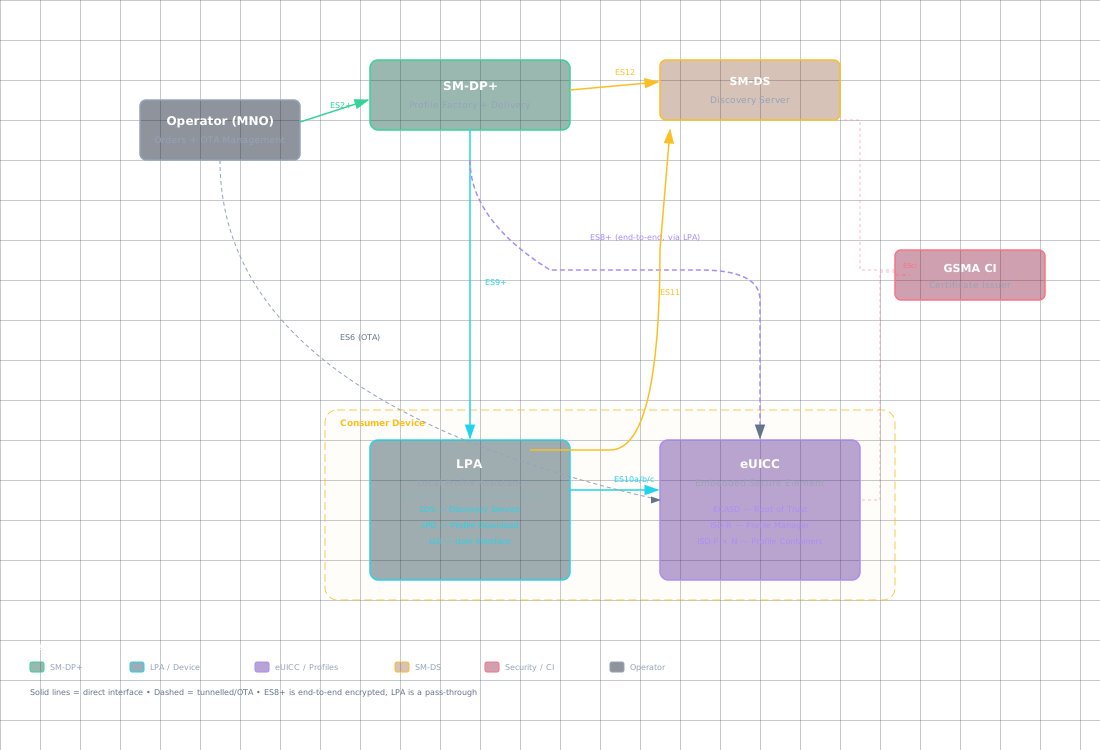
Key security properties:
- Isolation : Profiles are in separate ISD-Ps with GlobalPlatform-level isolation. No profile can access another’s keys or data.
- Forward secrecy :
ES8+provides Perfect Forward Secrecy via ephemeral session keys. Compromising the SM-DP+’s long-term key doesn’t expose past profile downloads. - Binding : Profiles are cryptographically bound to a specific eUICC. The SM-DP+ and eUICC perform an ephemeral ECDH key agreement to derive symmetric session keys. These session keys encrypt the profile, ensuring Perfect Forward Secrecy: the binding to a specific eUICC is enforced through mutual authentication signatures using that eUICC’s unique private key.
- Certificate revocation : CRLs (Certificate Revocation Lists) can be loaded onto the eUICC to blacklist compromised certificates.
Local Profile Management (What You See)
Through the LUI, you can:
- Enable a Profile : activates it for use (deactivates the previously enabled one)
- Disable a Profile : makes it dormant while keeping it installed
- Delete a Profile : permanently removes the ISD-P and all its contents
- List Profiles : shows installed profiles with names, ICCIDs, and states
- Set Nickname : custom label for each profile (“Work,” “Travel,” “Personal”)
- eUICC Memory Reset : factory resets the entire chip, deleting everything
The spec also defines Profile Policy Rules : for example, a rule can prevent the user from disabling a particular profile (used for corporate-managed devices).
Activation Codes in Practice
When you scan an eSIM QR code, you’re reading an Activation Code : an LPA:1 format string:
LPA:1$SMDP_ADDRESS$MATCHING_ID
That’s it. The device extracts the SM-DP+ URL and the Matching ID, then begins the mutual authentication flow. No internet connection is needed beyond reaching the SM-DP+ server: the eUICC handles all the crypto internally.
Summary
- RSP is the technology behind eSIM: it replaces physical SIM cards with a secure over-the-internet credential delivery protocol
- Five actors (eUICC, SM-DP+, SM-DS, LPA, Operator) interact across thirteen standardised interfaces to order, discover, deliver, and manage profiles
- Three delivery phases: initiation via
ES2+, mutual authentication viaES9+/ES10b, and encrypted download viaES8+: ensure end-to-end security on untrusted transport - A GSMA-rooted PKI with hardware-level isolation and perfect forward secrecy makes the system resilient even against compromised intermediaries
- The specification is extensive (296 pages in v2.7), but the core model is elegant and consistent throughout
Based on GSMA SGP.22 v2.7 (24 April 2026) : RSP Technical Specification
| Section Index | Next: SGP.22 v2.x vs v3.x: The Specification Split → |