eUICC.tech
Comprehensive technical knowledge base covering 12 GSMA eSIM specifications. 84+ articles on Remote SIM Provisioning — SGP.02, SGP.22, SGP.32, SGP.41, SGP.29, SGP.23, SGP.25, SGP.26 and more.
Project maintained by AlexsCodingAgent Hosted on GitHub Pages — Theme by mattgraham
How a Profile Gets Delivered: The eSIM Download Process
eUICC.tech > SGP.22 Consumer RSP > How a Profile Gets Delivered: The eSIM Download Process
Why this matters: The profile download is the core transaction in the eSIM ecosystem: it’s where all the cryptographic infrastructure proves itself. Every component (SM-DP+, SM-DS, LPA, eUICC, GSMA CI) participates. Understanding the full three-phase flow at protocol level is essential for debugging interoperability issues, implementing an RSP component, or integrating with any eSIM platform.
Key takeaways:
- Profile delivery spans three tightly-sequenced phases: ordering via
ES2+, mutual authentication viaES9+/ES10b, and encrypted installation viaES8+- The server must authenticate first : the eUICC is forbidden from revealing any private data or generating signed material before verifying the SM-DP+
- Four transformation stages turn raw operator data into a chip-locked encrypted package: UPP → PPP → BPP → SBPP
- All
ES8+communication uses SCP03t with Perfect Forward Secrecy keys from ephemeral ECDH: the LPA cannot read a single byte- 14 specific error codes catch every failure mode from ICCID collision to policy rule violations, with automatic rollback on failure
- How a Profile Gets Delivered: The eSIM Download Process
Downloading an eSIM profile is a multi-party cryptographic protocol involving the end user, the operator’s backend, the SM-DP+ profile factory, the SM-DS discovery server, the LPA on-device software, and the eUICC chip itself. The process is defined in SGP.22 Section 3 and spans three distinct phases, each with its own interfaces, security guarantees, and error-recovery mechanisms.
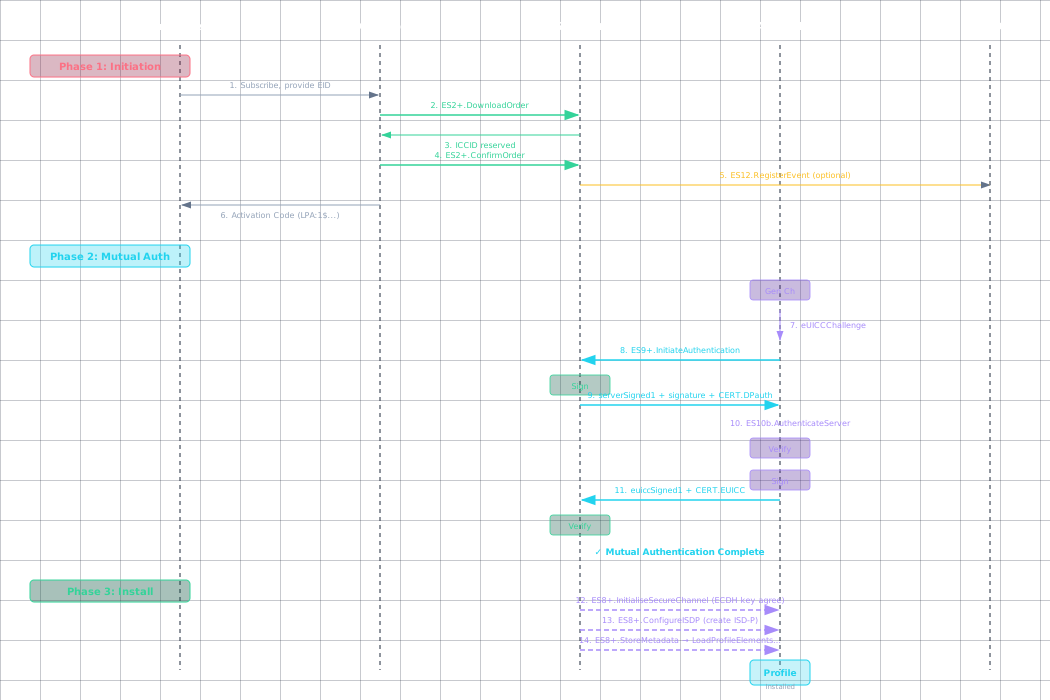
Phase 1: Initiation: Making the Order
Before a single byte of profile data moves, the operator must prepare a Profile for a specific eUICC and make it available for download. This phase uses the ES2+ interface between the Operator and SM-DP+, plus optionally ES12 for SM-DS event registration.
The Activation Code
The end user receives an Activation Code : a deceptively simple string that kicks off the entire process. The standard format is:
LPA:1$smdp.example.com$MATCHING-ID-12345
Breaking this down:
LPA:1: Protocol identifier and version. Tells the LPA this is an RSP activation codesmdp.example.com: The SM-DP+ address (FQDN or IP). The LPA connects hereMATCHING-ID-12345: An opaque identifier generated by the SM-DP+ that links the activation to a specific pending profile
Optional fields can appear after the Matching ID:
$CONFIRMATION-CODE: Used when the operator requires additional user verification$SM-DS-ADDRESS: Explicit SM-DS address for discovery
The Activation Code may also appear as a QR code encoding this same string. The LPA scans it, parses it, and initiates the download workflow. No user-identifying information is contained in the code: the security binding is entirely cryptographic.
ES2+ Ordering Flow
The operator communicates with the SM-DP+ through the ES2+ interface (a SOAP/HTTPS web service). Three ordering modes exist:
Default Mode: DownloadOrder → ConfirmOrder
Operator → SM-DP+: ES2+.DownloadOrder
 Parameters:
 - EID (optional: if provided, enables EID-based profile binding)
 - ProfileType (identifies the profile product/template)
 - ICCID (optional: operator-specified ICCID, or SM-DP+ allocates)
 - Notification recipients (callback URLs for status updates)

SM-DP+:
 - Validates that ProfileType exists and is active
 - If EID provided: checks eUICC compatibility
 - Allocates an ICCID (if not operator-specified)
 - Reserves profile capacity
 - Optionally registers an Event on the SM-DS (via ES12)

SM-DP+ → Operator: ICCID + EventID (if SM-DS used)

Operator → SM-DP+: ES2+.ConfirmOrder
 Parameters:
 - ICCID (confirms which order)
 - EID (mandatory if not provided in DownloadOrder)
 - MatchingID (generated by SM-DP+ or operator-specified)
 - Confirmation Code (optional: user-facing verification)
 - SM-DS Address (if push delivery desired)
 - ReleaseFlag (see below)
ReleaseFlag controls when the profile becomes available for download:
true: Profile is released immediately after confirmation. The device can download it right away.false: Profile is held in “pending” state. Requires a separateES2+.ReleaseProfilecall to activate. Useful for staged rollouts.
Activation Code Mode: ConfirmOrder Only
When the operator already has the eUICC information (e.g., from a previous EID capture during signup), they can skip DownloadOrder:
Operator → SM-DP+: ES2+.ConfirmOrder
 Parameters:
 - ICCID (previously allocated)
 - MatchingID (must match what will appear in the Activation Code)
 - EID
 - Confirmation Code (optional)
This is the fastest path: commonly used for prepaid activations and QR-code purchases.
SM-DS Push Mode
When the SM-DS is involved (for push notification rather than manual QR code scanning):
SM-DP+ → SM-DS: ES12.RegisterEvent
 Parameters:
 - EID (which eUICC should be notified)
 - EventID (generated by SM-DP+)
 - SM-DP+ Address (where the device should connect)
 - Event validity period

SM-DS: Stores the event record
The device polls the SM-DS periodically via ES11. When it finds a pending event, the LPA extracts the SM-DP+ address and Matching ID and initiates download automatically: no QR code needed.
Cancel and Release Operations
ES2+.CancelOrder : Cancels a pending order before the profile is downloaded:
Operator → SM-DP+: ES2+.CancelOrder(ICCID)
SM-DP+:
 - If profile not yet downloaded: releases ICCID, cancels SM-DS event
 - If profile already downloaded: returns error
ES2+.ReleaseProfile : Makes a held profile available for download:
Operator → SM-DP+: ES2+.ReleaseProfile(ICCID)
SM-DP+ → SM-DS: ES12.RegisterEvent (if SM-DS configured)
SM-DP+ → Operator: Confirmation
ES2+.HandleNotification : The SM-DP+ pushes status updates to operator callbacks:
DownloadProgress: incremental progress during installationDownloadCompleted: installation finished successfullyDownloadFailed: installation error with error codeProfileEnabled: profile was activated by the userProfileDeleted: profile was removed from the eUICC
Phase 2: Mutual Authentication: Cryptographic Identity Verification
Before any profile data flows, both endpoints must cryptographically prove their identities. This is the Common Mutual Authentication procedure: used identically for SM-DP+ and SM-DS communication: and it’s where the entire PKI infrastructure comes to life.
Protocol Overview
The mutual authentication exchange proceeds through 16 steps across three interfaces: ES10a (LPA → eUICC info), ES10b (LPA → eUICC auth), and ES9+ (LPA → SM-DP+).
┌─────────────────────────────────────────────────────────┐
│ Mutual Authentication Flow │
│ │
│ eUICC ◄──── ES10b ────► LPA ◄──── ES9+ ────► SM-DP+ │
│ │ │ │ │
│ │ 1. Generate challenge │ │ │
│ │ 2. Verify DP cert │ │ │
│ │ 3. Verify DP signature│ │ │
│ │ 4. Sign client proof │ │ │
│ │ │ │ │
│ └───────────────────────┴────────────────────┘ │
│ Server authenticates FIRST │
│ eUICC never reveals data before verification │
└─────────────────────────────────────────────────────────┘
Step-by-Step Detail
Steps 1–2: Gathering eUICC Information (Optional)
LPA → eUICC: ES10a.GetEUICCInfo
 Parameters: None

eUICC → LPA: euiccInfo1
 - SVN (Specification Version Number: which SGP.22 version)
 - eUICC firmware version
 - Available memory (free non-volatile storage)
 - Supported Java Card / GlobalPlatform version
 - Supported profile protection types (single-layer, dual-layer)
 - URIC (Universal RSP Identifier Code)
The SM-DP+ uses euiccInfo1 to verify compatibility before sending a profile. If the eUICC doesn’t support the profile’s required features, the SM-DP+ can abort early without wasting bandwidth.
Steps 3–4: Challenge Generation
LPA → eUICC: ES10b.GetEUICCChallenge

eUICC:
 1. Generate a cryptographically random euiccChallenge (32 bytes)
 2. Store it internally for later verification
 3. The challenge is fresh for every session: no reuse

eUICC → LPA: euiccChallenge, euiccInfo1
The euiccChallenge is a nonce that prevents replay attacks. Without it, an attacker could capture a valid authentication and replay it to impersonate the eUICC.
Step 5: TLS Establishment
LPA ↔ SM-DP+: Establish HTTPS connection

LPA:
 1. Initiates standard TLS 1.2+ handshake with SM-DP+
 2. Server presents CERT.DP.TLS (X.509)
 3. LPA verifies CERT.DP.TLS:
 a. Certificate chain leads back to GSMA CI root
 b. Certificate is within validity period
 c. Certificate has not been revoked (CRL check)
 d. Subject Alternative Name matches the SM-DP+ address
 4. If TLS verification fails → abort with user-visible error

SM-DP+: Standard server-side TLS
The TLS layer provides transport security between the LPA and SM-DP+. But critically, the RSP spec does not trust TLS alone: the mutual authentication adds an additional application-layer cryptographic binding on top.
Steps 6–7: Authentication Initiation
LPA → SM-DP+: ES9+.InitiateAuthentication
 Parameters:
 - euiccChallenge (raw bytes from eUICC)
 - euiccInfo1 (as received from eUICC)
 - SM-DP+ Address (the address the LPA connected to)

SM-DP+:
 1. Verifies SM-DP+ Address matches its own known address
 (prevents MITM relay attacks)
 2. Checks euiccInfo1 for compatibility:
 - SVN version compatibility
 - Available memory sufficient for profile
 - Profile type supported by eUICC
 3. If incompatible → return error, do not proceed
 4. Generates a fresh TransactionID (UUID: binds entire session)
 5. Generates a fresh serverChallenge (random 32 bytes)
 6. Retrieves the appropriate CI public key identifier
 (euiccCiPKIdToBeUsed: tells the eUICC which CI key to use)
Steps 8–9: Server Signs the Challenge
This is the critical authentication step where the SM-DP+ proves its identity:
SM-DP+ builds serverSigned1:
 serverSigned1 = {
 TransactionID, // Fresh UUID for this session
 euiccChallenge, // Echo: proves server saw the challenge
 serverChallenge, // Server's own fresh nonce
 SM-DP+ Address // Prevents redirect to a different SM-DP+
 }

SM-DP+ computes serverSignature1:
 serverSignature1 = ECDSA_Sign(
 SK.DPauth.ECDSA, // SM-DP+'s private authentication key
 SHA256(serverSigned1) // Hash before signing
 )

SM-DP+ → LPA:
 - TransactionID
 - serverSigned1 (raw structure)
 - serverSignature1 (ECDSA signature, DER-encoded)
 - euiccCiPKIdToBeUsed (which CI key the eUICC should verify against)
 - CERT.DPauth.ECDSA (SM-DP+ authentication certificate)
Steps 10–14: eUICC Verifies the Server
This is where the eUICC’s secure element flexes its cryptographic muscles:
LPA → eUICC: ES10b.AuthenticateServer
 Parameters:
 - serverSigned1
 - serverSignature1
 - euiccCiPKIdToBeUsed
 - CERT.DPauth.ECDSA
 - ctxParams1 (context: includes MatchingID, Confirmation Code if applicable)

eUICC performs verification, IN ORDER:

1. Certificate Chain Verification:
 a. Look up PK.CI.ECDSA in ECASD using euiccCiPKIdToBeUsed
 b. Verify CERT.DPauth.ECDSA signature using PK.CI.ECDSA
 c. Verify certificate validity period
 d. Check CRL for revocation status
 e. If any check fails → abort with authentication error

2. Signature Verification:
 a. Extract PK.DPauth.ECDSA from CERT.DPauth.ECDSA
 b. Verify serverSignature1 over SHA256(serverSigned1)
 c. If signature invalid → abort (possible MITM attack)

3. Challenge Verification:
 a. Extract euiccChallenge from serverSigned1
 b. Verify it matches the challenge sent in Step 4
 c. If mismatch → abort (replay attack detected)

4. Address Verification:
 a. Extract SM-DP+ Address from serverSigned1
 b. Verify it matches expected address
 c. If mismatch → abort (redirect attack detected)

IF ALL CHECKS PASS:

eUICC now trusts the SM-DP+. It proceeds to:
 a. Generate euiccSigned1 = {
 TransactionID, // Must match server's TransactionID
 serverChallenge, // Echo: proves eUICC saw server challenge
 euiccInfo2, // eUICC info (different from euiccInfo1)
 ctxParams1 // Echo context params (binds to LPA session)
 }
 b. Compute euiccSignature1 = ECDSA_Sign(
 SK.EUICC.ECDSA, // eUICC's private key (never leaves ECASD)
 SHA256(euiccSigned1)
 )

eUICC → LPA:
 - euiccSigned1
 - euiccSignature1
 - CERT.EUICC.ECDSA (eUICC's unique certificate)
 - CERT.EUM.ECDSA (EUM certificate for chain verification)
euiccInfo2 vs euiccInfo1:
euiccInfo1is informational (version, memory, capabilities) : sent before server autheuiccInfo2is the signed attestation: includes the same data but cryptographically bound to the session, proving it came from a genuine eUICC
ctxParams1 carries context from the LPA. It typically includes:
matchingId: extracted from the Activation CodeconfirmationCode: if the user entered one- Additional LPA-specific parameters
The eUICC signing ctxParams1 into euiccSigned1 binds the LPA’s session context to the cryptographic handshake, preventing an attacker from substituting a different Matching ID.
Steps 15–16: SM-DP+ Verifies the eUICC
LPA → SM-DP+: ES9+.AuthenticateClient
 Parameters:
 - TransactionID
 - euiccSigned1
 - euiccSignature1
 - CERT.EUICC.ECDSA
 - CERT.EUM.ECDSA

SM-DP+ performs verification, IN ORDER:

1. EUM Certificate Verification:
 a. Verify CERT.EUM.ECDSA signature using PK.CI.ECDSA
 b. Verify EUM is listed in GSMA SAS-UP certified manufacturers
 c. Check CRL for EUM certificate revocation

2. eUICC Certificate Verification:
 a. Extract PK.EUM.ECDSA from CERT.EUM.ECDSA
 b. Verify CERT.EUICC.ECDSA signature using PK.EUM.ECDSA
 c. Verify eUICC certificate validity period

3. Signature Verification:
 a. Extract PK.EUICC.ECDSA from CERT.EUICC.ECDSA
 b. Verify euiccSignature1 over SHA256(euiccSigned1)

4. Content Verification:
 a. Verify TransactionID matches
 b. Verify serverChallenge matches (was echoed correctly)
 c. Extract MatchingID from euiccSigned1.ctxParams1
 d. Match the profile to this specific eUICC + MatchingID

IF ALL CHECKS PASS:
 The SM-DP+ now has:
 - Verified it's talking to a genuine GSMA-certified eUICC
 - Confirmed the eUICC's unique identity (EID from CERT.EUICC)
 - Bound the transaction to the correct MatchingID
 - Established cryptographic proof that neither side is being impersonated
Key Security Properties
| Property | How It’s Enforced |
|---|---|
| Server authenticates first | eUICC SHALL NOT reveal private data or generate signed material before verifying server (SGP.22 §3.1.2) |
| LPA is untrusted | All crypto happens on eUICC. LPA only transports opaque blobs. No LPA key material exists. |
| Replay prevention | Fresh euiccChallenge + serverChallenge per session. TransactionID binds all steps. |
| MITM prevention | SM-DP+ Address in serverSigned1 : the eUICC checks it matches |
| Forward secrecy | Separate key agreement after auth (see Phase 3). Compromised long-term keys don’t expose past sessions. |
| Revocation | CRL checking at both ends before trusting any certificate |
Phase 3: Profile Download and Installation
With mutual authentication complete, the actual profile download begins. This phase uses the ES8+ interface: an end-to-end encrypted channel between SM-DP+ and eUICC that tunnels through the LPA. The LPA sees encrypted ciphertext only.
The ES8+ Protocol
ES8+ is not a transport protocol: it’s a message format carried by the LPA:
SM-DP+ → LPA (HTTPS/ES9+): ES8+ command block
LPA → eUICC (APDU/ES10b): ES8+ command block (opaque: LPA cannot decrypt)
eUICC → LPA: ES8+ response block
LPA → SM-DP+: ES8+ response block (opaque: LPA cannot decrypt)
Every ES8+ command is encrypted with SCP03t (GlobalPlatform Secure Channel Protocol 03, transport-optimised) using session keys derived from an ephemeral ECDH key exchange. This provides:
- Confidentiality : AES-128-CBC encryption
- Integrity : AES-CMAC-128 message authentication
- Perfect Forward Secrecy : ephemeral keys discarded after transaction
- Replay protection : MAC chaining with incrementing counters
Step 1: Secure Channel Establishment
SM-DP+ → eUICC (via LPA): ES8+.InitialiseSecureChannel

SM-DP+ generates:
 1. Ephemeral ECDH key pair (otPK.DP.ECKA, otSK.DP.ECKA)
 - ECKA = Elliptic Curve Key Agreement (P-256)
 - These keys exist only for this one transaction
 2. Key agreement data = {otPK.DP.ECKA, key usage qualifier}

SM-DP+ sends the key agreement data to the eUICC.
The data is sent in the clear (integrity from mutual auth signatures).

eUICC:
 1. Generates its own ephemeral ECDH key pair
 2. Computes shared secret = ECDH(otSK.EUICC.ECKA, otPK.DP.ECKA)
 3. Derives session keys from shared secret using KDF:
 - S-ENC = AES-128-CBC encryption key
 - S-MAC = AES-128-CMAC integrity key
 - Initial MAC chaining value
 4. Returns its ephemeral public key to SM-DP+

SM-DP+:
 1. Computes shared secret = ECDH(otSK.DP.ECKA, otPK.EUICC.ECKA)
 2. Derives same session keys (identical derivation function)

BOTH SIDES NOW HAVE: S-ENC, S-MAC, initial MAC chaining value
Why ephemeral ECDH? The SM-DP+ generates a fresh key pair for every transaction. Even if an attacker later compromises the SM-DP+’s long-term authentication key (SK.DPauth.ECDSA), they cannot decrypt past profile downloads because the session keys are derived from ephemeral keys that were discarded immediately after use. This is Perfect Forward Secrecy.
The session keys are used for all subsequent ES8+ commands (until ReplaceSessionKeys swaps them out).
Step 2: ISD-P Creation
SM-DP+ → eUICC (via LPA): ES8+.ConfigureISDP
 Payload (encrypted with S-ENC, MACed with S-MAC):
 - ISD-P AID (Application ID: unique identifier for this profile slot)
 - ISD-P configuration parameters
 - Initial security domain keys
 - Privileges and life-cycle state

eUICC:
 1. Decrypts and verifies MAC
 2. Creates new ISD-P in the eUICC file system
 3. Allocates storage quota
 4. Initialises ISD-P to CREATED state
 5. If any step fails → rollback, return specific error code

eUICC → SM-DP+: ISD-P creation status (success or error code)
The ISD-P is the container that will hold the operator’s profile. It’s a GlobalPlatform Issuer Security Domain with a dedicated key set, completely isolated from other ISD-Ps on the same chip.
Step 3: Store Metadata
SM-DP+ → eUICC (via LPA): ES8+.StoreMetadata
 Payload (MAC protected: metadata is non-sensitive):
 - ICCID (Integrated Circuit Card ID: globally unique SIM identifier)
 - Profile Name (operator-displayable, e.g., "Vodafone UK")
 - Operator Name (MNO name)
 - Profile Class:
 - Operational (standard user profile)
 - Provisioning (used during manufacturing/testing)
 - Test (non-operational)
 - Profile Policy Rules (PPR):
 - ppr1: Disabling allowed? (YES/NO)
 - ppr2: Deletion allowed? (YES/NO)
 - ppr3: Profile deletion notification required?
 - Additional operator-defined rules
 - Icon (optional: displayed in LUI profile switcher)
 - Contact information (operator support details)

eUICC:
 1. Verifies MAC
 2. Stores metadata in ISD-P's file system
 3. If ICCID already exists on eUICC → error code 9
 4. If PPR conflicts with Profile Policy Enabler → error code 15
Why MAC-only for metadata? Metadata is not secret: the ICCID and operator name are publicly meaningful. Encryption would add unnecessary overhead. The MAC ensures the metadata hasn’t been tampered with in transit.
Step 4: Replace Session Keys (Optional: Dual-Layer Protection)
This step is only used when the profile was pre-encrypted at the SM-DP+ (dual-layer protection):
SM-DP+ → eUICC (via LPA): ES8+.ReplaceSessionKeys
 Payload (encrypted with current S-ENC, MACed with S-MAC):
 - PPK-ENC (Profile Protection Key: encryption)
 - PPK-MAC (Profile Protection Key: MAC)
 - New MAC chaining value
 - Profile protection key identifier

eUICC:
 1. Decrypts new keys using current S-ENC
 2. Verifies MAC using current S-MAC
 3. Atomically swaps: S-ENC → PPK-ENC, S-MAC → PPK-MAC
 4. Subsequent ES8+ commands use the new keys
Single-layer vs Dual-layer protection:
| Aspect | Single-Layer | Dual-Layer |
|---|---|---|
| Profile encryption | Real-time, during download | Pre-encrypted at SM-DP+ |
| When profile is ready | When eUICC connects | Hours/days before connection |
| Session keys used | S-ENC/S-MAC (from ECDH) | PPK-ENC/PPK-MAC (profile-specific) |
| Scale | Good for on-demand | Better for bulk pre-generation |
| Session key rotation | N/A | Via ReplaceSessionKeys |
Dual-layer protection enables profile pre-generation : critical when thousands of profiles need to be ready before the devices even power on.
Step 5: Load Profile Elements
This is the bulk data transfer. The profile payload is streamed in multiple ES8+.LoadProfileElements calls:
SM-DP+ → eUICC (via LPA): ES8+.LoadProfileElements (repeated until complete)
 Each payload (encrypted SCP03t envelope):
 - One or more Profile Elements (TLV-encoded)
 - MAC chaining value (increments with each segment)
 - Sequence number (for reassembly and gap detection)

Profile Element types:
 - PE-TAR (Tar File) : SIM file system binary
 - PE-NAA (Network Access Application) : authentication applet
 - PE-CD (Content Description) : metadata descriptor
 - PE-SD (Supplementary Security Domain) : additional isolation
 - PE-AC (Access Control) : file access permissions
 - PE-KEYS (Cryptographic Keys) : OTA keys, authentication vectors
 - PE-END (End Marker) : signals installation complete

For each element:
 eUICC Profile Package Interpreter:
 1. Decrypts element (S-ENC or PPK-ENC)
 2. Verifies MAC
 3. Validates TLV structure
 4. Checks element against profile policy rules
 5. Writes to ISD-P file system
 6. If any element fails:
 - Rollback entire installation (removes ISD-P)
 - Return specific error code to SM-DP+

 eUICC → SM-DP+:
 - Elements processed count
 - Success or error code per segment
The Profile Package Interpreter is the eUICC’s internal component that understands Profile Element TLV format. It’s essentially a specialised bytecode interpreter: each element is a command that creates files, installs applets, or writes keys.
SCP03t transport encoding:
- Command APDU format:
[CLA][INS][P1][P2][Lc][Data][Le] - Response APDU format:
[Data][SW1][SW2] - Each APDU ≤ 255 bytes (standard ISO 7816-4 limit)
- Extended APDU support for larger payloads (up to 65535 bytes)
- MAC chaining: each command’s MAC is chained to the previous, creating a cryptographic ordering guarantee
Step 6: Finalisation
After the last LoadProfileElements call (containing PE-END):
SM-DP+ → eUICC (via LPA): ES8+.FinaliseISDP

eUICC:
 1. Verifies all elements were received
 2. Runs integrity check on ISD-P file system
 3. Transitions ISD-P from CREATED → DISABLED state
 4. Seals the ISD-P (no further modifications without new session)
 5. Discards session keys (S-ENC, S-MAC, PPK keys)
 6. Logs installation completion

SM-DP+ → Operator: ES2+.HandleNotification(DownloadCompleted, ICCID, ...)
The Profile is now installed on the eUICC in the Disabled state. It will not become active until the user (or LPA) explicitly enables it via ES10c.EnableProfile. If this is the only profile on the eUICC (or the first one), the LPA may enable it immediately after installation.
Profile Package Stages
The profile data transforms through four stages from raw operator data to encrypted eUICC installation:
| Stage | Name | What Happens | Where | Protection |
|---|---|---|---|---|
| 1. UPP | Unprotected Profile Package | Operator profile data assembled into Trusted Connectivity Alliance (TCA, formerly SIMalliance) TLV structure | Inside SM-DP+ | None (internal only) |
| 2. PPP | Protected Profile Package | UPP encrypted with SCP03t. Profile Protection Keys generated. | Inside SM-DP+ | Encrypted (PPK-ENC/MAC) |
| 3. BPP | Bound Profile Package | PPP + ECDH key agreement + ISD-P config + metadata. Cryptographically locked to one specific eUICC. | SM-DP+ output | Bound to eUICC via ECDH + ECDSA |
| 4. SBPP | Segmented Bound Profile Package | BPP split into STORE DATA APDU sequence for ISO 7816 transport | In transit LPA → eUICC | SCP03t encrypted per-APDU, MAC-chained |
Why four stages? The progression reflects increasing specificity:
- UPP is generic: any operator could produce this
- PPP encrypts it: now only someone with the PPK can read it
- BPP locks it to a chip: even with the PPK, it won’t install on a different eUICC
- SBPP chunks it for transport: accommodating the 255-byte APDU limit
The cryptographic binding at stage 3 (BPP) is what makes eSIM profiles non-transferable. Copying the BPP to another device is useless: the ECDH key agreement ensures it only decrypts on the eUICC that possesses the matching private key.
Complete Error Code Reference
SGP.22 defines 14 specific error codes for profile installation failures. Each is returned through the ES8+ channel to the SM-DP+, which may relay them to the operator via ES2+ notifications.
| Code | Name | What Went Wrong | Recovery |
|---|---|---|---|
| 1 | installFailedDueToGenericError |
Unspecified failure | Retry or escalate |
| 2 | installFailedDueToAuthenticationFailure |
Mutual auth verification failed | Check certificates, retry |
| 3 | installFailedDueToUserRejection |
User dismissed the download | Wait for user retry |
| 4 | installFailedDueToTimeout |
Session expired | Restart from Phase 2 |
| 5 | installFailedDueToPprNotAllowedByPolicy |
PPRs conflict with Profile Policy Enabler | Review policy configuration |
| 6 | installFailedDueToInvalidatedConfirmationCode |
Confirmation code wrong after 3 attempts | Regenerate code |
| 7 | installFailedDueToInvalidatedConfirmationCodeMaxAttemptsReached |
Confirmation code retries exhausted | New activation needed |
| 8 | installFailedDueToProfileInvalid |
Profile incompatible with eUICC | Check profile/eUICC versions |
| 9 | installFailedDueToIccidAlreadyExistsOnEuicc |
ICCID collision | Delete existing profile, retry |
| 10 | installFailedDueToInsufficientMemoryForProfile |
Not enough free storage | Free space or smaller profile |
| 11 | installFailedDueToInterruption |
Download interrupted mid-stream | Resume or restart |
| 12 | installFailedDueToPEProcessingError |
Profile Element TLV decode/install failed | Fix profile package |
| 13 | installFailedDueToDataMismatch |
Integrity check failed | Retry: possible corruption |
| 14 | installFailedDueToForbiddenByPolicy |
Profile Policy Enabler blocked operation | Review PPE configuration |
| 15 | pprNotAllowed |
Specific PPR violation (e.g., deletion when ppr2=false) | Review PPRs |
Rollback behaviour: For errors during installation (codes 9–14), the eUICC automatically rolls back: the partially-installed ISD-P is removed, storage is reclaimed, and the eUICC returns to its pre-download state. The SM-DP+ reports the failure to the operator, who may retry or issue a new order.
Special Scenarios and Edge Cases
Resumable Downloads
If a download is interrupted (installFailedDueToInterruption), the SM-DP+ can attempt a resumable download. The eUICC retains partial state and the SM-DP+ can skip already-delivered elements. Resumption is signalled in the InitialiseSecureChannel parameters.
Multiple Concurrent Downloads
SGP.22 permits only one active profile download per eUICC at a time. If a second download is attempted while one is in progress, the eUICC returns an error. The LPA must serialise download requests.
Profile Replacement
ES2+ supports a ReplaceProfile option during ordering. The new profile can automatically replace an existing one:
- Old profile is disabled
- New profile is downloaded and installed
- Old profile is optionally deleted after successful installation
- Used for seamless carrier migration
Emergency Profiles
Some profiles are designated as Emergency Profiles : they bypass normal policy restrictions and must always be installable. Used for critical security updates or regulatory compliance.
Test Profiles
Test profiles are marked with Profile Class = Test. They have relaxed security requirements and are used during development and certification. Production eUICCs may reject test profiles based on their Profile Policy Enabler configuration.
Summary
- Profile delivery uses three phases across five interfaces:
ES2+(ordering),ES9+/ES10a/ES10b(mutual authentication), andES8+(encrypted installation) - The Activation Code (
LPA:1$...) is the user-visible entry point: it contains only the SM-DP+ address and a Matching ID, all security is cryptographic - Mutual authentication uses ECDSA P-256 with server-authenticates-first ordering: the eUICC reveals nothing before verifying the SM-DP+
- Session keys are derived from ephemeral ECDH, providing Perfect Forward Secrecy: compromising the SM-DP+ long-term key exposes zero past downloads
- The profile package goes through four stages (UPP → PPP → BPP → SBPP), with stage 3 cryptographically locking it to one specific chip
- SCP03t encryption protects every
ES8+command with AES-128-CBC + AES-CMAC-128 + MAC chaining - 15 specific error codes cover every failure mode, with automatic rollback on installation failure
- The LPA is a completely passive transport: all cryptographic operations happen on the eUICC and SM-DP+ endpoints
- The Profile Package Interpreter inside the eUICC decodes Profile Element TLVs sequentially, rolling back the entire installation if any element fails
Based on GSMA SGP.22 v2.7 (24 April 2026), Section 3: Procedures, Section 4.5: Keys and Certificates, and Section 5: ES8+ Protocol Specification
| ← Previous: Inside the eUICC: The Secure Element That Powers Your eSIM | Section Index | Next: eSIM Security: The PKI and Certificate Model → |