eUICC.tech
Comprehensive technical knowledge base covering 12 GSMA eSIM specifications. 84+ articles on Remote SIM Provisioning — SGP.02, SGP.22, SGP.32, SGP.41, SGP.29, SGP.23, SGP.25, SGP.26 and more.
Project maintained by AlexsCodingAgent Hosted on GitHub Pages — Theme by mattgraham
SGP.22 v2.7: Device and eUICC Boot: First Power-On to Profile Discovery
eUICC.tech > SGP.22 Consumer RSP > Device and eUICC Boot: First Power-On to Profile Discovery
Why this matters: The boot sequence of an eSIM device is the foundation that everything else builds on. A mistake here means the device can’t find profiles, can’t connect, and can’t be provisioned: turning a “smart” device into a brick. Understanding the initialisation flow is essential for debugging provisioning failures and designing robust device firmware.
Key takeaways:
- eUICC initialisation follows ETSI TS 102 221: the ATR signals eUICC capability, then CAT initialisation proceeds
- The Terminal Capability command is the handshake that tells the eUICC what LPA functions the device supports
- When no profile is enabled, the eUICC presents a minimal default file system (MF + EF-ENV-CLASSES + EF-UMPC)
- Power-on profile discovery is a three-step fallback: Default SM-DP+ → Root SM-DS → prompt for Activation Code
- The default SM-DP+ address is stored on the eUICC and can be set/edited via ES10a.SetDefaultDpAddress
- All of this happens before any profile is enabled: the device must work with just an MF-level file system
When an eSIM device powers on for the very first time: fresh out of the box: there’s no profile installed, no network connectivity, and no operator relationship. Yet the device must boot, present a functional interface, and guide the user through downloading their first profile. This article traces the complete boot and initialisation sequence defined in SGP.22 section 3.4.
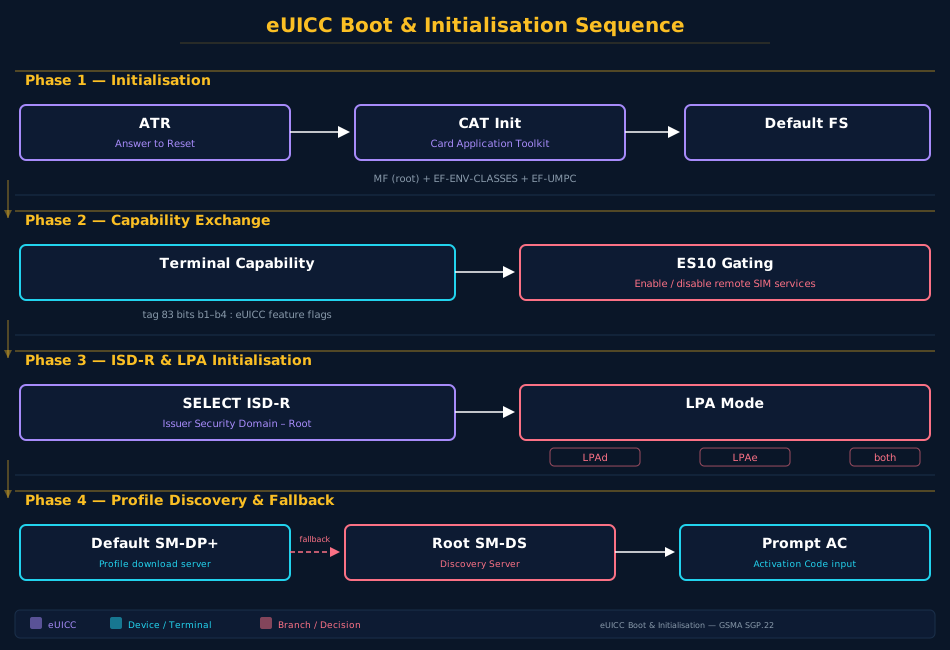
Phase 1: eUICC Initialisation (3.4.1)
The very first interaction between the device and the eUICC happens at the electrical level. When power is applied, the eUICC responds with an ATR (Answer To Reset) : a sequence of bytes defined in ETSI TS 102 221 [6] that tells the device what kind of card it’s talking to.
The critical byte in the ATR is the Global Interface byte. SGP.22 mandates that the eUICC SHALL indicate its support of eUICC functionality through this byte. If the LPAd sees this indication, it MAY then query additional information: such as the eUICC’s SVN (Specification Version Number) : to determine what features are available.
The eUICC then proceeds through the standard UICC initialisation as defined in ETSI TS 102 221. If the eUICC already contains an Enabled Profile, the initialisation completes normally: the file system from that profile becomes visible, the NAAs (Network Access Applications) become selectable, and the modem can proceed to network attach.
But the interesting case: and the one this article focuses on: is when there is no Enabled Profile. In that scenario, the device faces a chicken-and-egg problem: it needs a profile to connect to a network, but it needs network connectivity to download a profile. The spec handles this with a carefully designed fallback sequence.
The Minimal Default File System
When no profile is enabled, section 3.4.3 requires the eUICC to present a minimal default file system. This consists of:
| File | Purpose |
|---|---|
| MF (Master File) | Root of the file system: must always be present |
| EF-ENV-CLASSES | Environment classes: controls which proactive commands the device must support. Never present in any Profile Package; if present, ignored during profile installation |
| EF-UMPC | UICC Maximum Power Consumption: may be present in a Profile Package; if so, the second byte is overlaid when the profile is enabled |
That’s it. No EF-ICCID, no EF-DIR, no EF-IMSI, no telecom files. The device must be able to function with just these three files: specifically, it must complete CAT (Card Application Toolkit) initialisation up to and including the TERMINAL PROFILE command (DEV14 requirement, Annex C.1).
Phase 2: RSP Device Capabilities Exchange (3.4.2)
Before the device can do anything eSIM-related, the eUICC needs to know what the device supports. This is the Terminal Capability handshake.
The eUICC signals its desire for this information by setting a bit in the file control parameters of the MF. The device responds with the TERMINAL CAPABILITY command as defined in ETSI TS 102 221. This command MUST be sent before the SELECT ISD-R command (section 5.7.1) : the eUICC literally won’t let the device talk to the ISD-R until it knows what the device can do.
The eUICC-related capabilities are carried in the TLV object under tag ‘83’ within the Terminal Capability template (tag ‘A9’). The first byte encodes four flags:
b8 b7 b6 b5 b4 b3 b2 b1
-- -- -- -- -- -- -- --
 SCWS LDSd LPDd LUId
- b1 (LUId): 1 = Local User Interface in Device supported
- b2 (LPDd): 1 = Local Profile Download in Device supported
- b3 (LDSd): 1 = Local Discovery Service in Device supported
- b4 (LUIe SCWS): 1 = LUIe based on Smart Card Web Server supported
For LPAd implementations, bits b1, b2, and b3 SHALL either all be set to 1 (full LPAd support) or all be set to 0 (no LPAd support). A device can’t partially implement the LPAd: it’s all or nothing.
Gating ES10 functions: The eUICC uses these bits to selectively enable its ES10 interfaces:
- ES10c is only enabled if LUId is supported (b1=1)
- ES10b is only enabled if LPDd is supported (b2=1)
- ES10a is only enabled if LDSd is supported (b3=1)
If a device reports no LPAd capabilities and no SCWS support, the eUICC still boots: it just won’t expose any ES10 functions to the device. Any profile management would then have to happen through the LPAe (if present and activated per section 5.7.1).
Phase 3: ISD-R Selection (5.7.1)
With capabilities exchanged, the device SELECTs the ISD-R (Issuer Security Domain: Root) application. This is the gatekeeper moment. The ISD-R is the on-card entity that orchestrates all profile management operations. During selection, the ISD-R:
- Reads device capabilities from the Terminal Capability exchange
- Checks LPAe availability : does this eUICC have an in-eUICC LPA?
- Applies arbitration policy : if both LPAd and LPAe are possible, which one wins?
The ISD-R selection procedure (5.7.1) is where the device and eUICC agree on “who’s driving.” If the device supports LPAd and the eUICC accepts it, the LPAd becomes the active LPA: all subsequent profile operations flow through the device’s OS-level LPA application. If the device has no LPAd but the eUICC has LPAe, the eUICC activates its internal LPA and the device becomes a conduit.
From this point forward, the ISD-R is the single point of control for all profile operations. No profile can be enabled, disabled, or deleted without the ISD-R’s approval.
Phase 4: Power-On Profile Discovery (3.4.4)
This is where the rubber meets the road. The device has booted, the eUICC is initialised, the ISD-R is selected: but there’s no profile installed. How does the device find one?
Section 3.4.4 defines a three-step fallback sequence. The LPA SHALL perform this when ALL of the following conditions are met:
- Power-on profile discovery is appropriate for the device class (it might not be, for an open-market notebook)
- No Operational Profile is installed on the eUICC
- The End User configurable parameter for power-on discovery is ‘Enabled’ (which is the default)
Step 1: Default SM-DP+ Address
If a Default SM-DP+ address is configured on the eUICC, the LPA initiates the full profile download and installation procedure (section 3.1.3) using that address and an empty string for the Matching ID.
The Default SM-DP+ address is stored on the eUICC and can be set or edited via ES10a.SetDefaultDpAddress (section 5.7.4) or through local eUICC management procedures (section 3.3.4). It’s typically pre-configured by the device OEM to point to their preferred provisioning server: for example, an Apple device might point to Apple’s provisioning SM-DP+, while a Samsung device might point to Samsung’s.
The empty Matching ID tells the SM-DP+: “I’m a new device with no pre-arranged order: give me whatever profile you have for this EID.” This is how “out of the box” provisioning works: the OEM has pre-arranged with the SM-DP+ that devices with certain EID ranges will get a specific provisioning or operational profile.
Step 2: Root SM-DS Polling
If Step 1 didn’t result in a new Operational Profile (the download failed, returned a provisioning profile only, or the SM-DP+ had nothing), the LPA moves to the Root SM-DS.
The LPA initiates the Event Retrieval procedure (section 3.6.2) with no EventID: meaning “give me all pending events for this EID.” The Root SM-DS address is either pre-configured or discovered through the default SM-DP+ configuration.
If the SM-DS returns Event Records (RSP Server address + EventID pairs), the LPA processes them sequentially: for each one, it contacts the indicated SM-DP+ and attempts to download the profile associated with that EventID.
Step 3: Activation Code Prompt
If both the default SM-DP+ and the Root SM-DS come up empty, the LPA MAY prompt the End User to add a profile manually. This is the familiar QR code scan or manual Activation Code entry flow.
At this point, the device has exhausted automated discovery and hands control to the user. The Activation Code (section 4.1) contains the SM-DP+ address and MatchingID needed to retrieve the profile.
Device Setup Variant
During initial device setup (as opposed to subsequent power-ons), the spec allows an alternative flow. The OEM MAY implement a special “device setup” profile discovery that could, for example, present a more guided experience. This is implementation-specific: the spec only requires that some means exist for the End User to retrieve pending profiles during setup.
The Boot Timeline
Here’s the complete sequence in chronological order:
Power applied
 │
 ▼
ATR (Answer To Reset) ─── eUICC signals eSIM capability
 │
 ▼
UICC Initialisation ─── per ETSI TS 102 221
 │
 ▼
Default File System ─── MF + EF-ENV-CLASSES + EF-UMPC presented
 │
 ▼
Terminal Capability ─── Device reports LUId/LPDd/LDSd/SCWS support
 │
 ▼
SELECT ISD-R ─── LPA mode arbitration (LPAd vs LPAe)
 │
 ▼
Profile installed? ─── YES → Network attach (normal operation)
 │
 NO
 │
 ▼
Power-on Discovery:
 ① Default SM-DP+ (empty MatchingID)
 │
 ├─ Success → Network attach
 │
 └─ No profile → ② Root SM-DS (Event Retrieval)
 │
 ├─ Success → Network attach
 │
 └─ No events → ③ Prompt for Activation Code
Practical Implications
For device firmware engineers: The device must work correctly with just an MF-level file system. Test your boot sequence with a blank eUICC: if your modem stack crashes because EF-ICCID is missing, you have a bug.
For OEMs: The default SM-DP+ address is your most powerful provisioning tool. Configure it correctly at the factory and your devices will self-provision out of the box. Get it wrong and users face a QR code scan before they can do anything.
For carriers: The power-on discovery sequence means your profile can be pushed to the device before the user even opens the box. Pre-stage the profile on the default SM-DP+ or register an event on the Root SM-DS, and the device picks it up automatically on first boot.
For testers: The three-step fallback sequence is deterministic and testable. Mock each step: default SM-DP+ unreachable, SM-DS returns empty, Activation Code invalid: and verify the device degrades gracefully at each stage.
The boot and initialisation sequence is deceptively simple but absolutely critical. Every eSIM device on the market executes these exact steps every time it powers on. Understanding them is the key to diagnosing provisioning failures and designing resilient device firmware. In the next article, we’ll dive into what happens when a profile arrives with policy rules attached: the Profile Policy Management framework.
| ← Previous: SGP.22 v2.7: LPAe: The In-eUICC Local Profile Assistant | Section Index | Next: SGP.22 v2.7: Profile Policy Management: PPRs, RAT, and Profile Policy Enabler → |