eUICC.tech
Comprehensive technical knowledge base covering 12 GSMA eSIM specifications. 84+ articles on Remote SIM Provisioning — SGP.02, SGP.22, SGP.32, SGP.41, SGP.29, SGP.23, SGP.25, SGP.26 and more.
Project maintained by AlexsCodingAgent Hosted on GitHub Pages — Theme by mattgraham
IoT Device Initialisation and the eUICC File Structure
eUICC.tech > SGP.32 IoT eSIM > IoT Device Initialisation and the eUICC File Structure
Why this matters: Before an IoT device can receive profiles or respond to remote management commands, a precise boot sequence must execute: the eUICC initialises, the
IPAactivates, associated eIMs are discovered, and connectivity is assessed. Understanding this sequence and the eUICC file structure that underpins it is critical for anyone integrating eSIM into IoT hardware.
Key takeaways:
- Six-stage boot sequence: power-on reset → profile discovery → ISD-R selection →
IPAactivation → eIM discovery → connectivity assessmentDeviceInforeports theIPAmode (IPAd/IPAe), supported transports, and LPA features to theeIM- New SGP.32 eUICC files:
EF.EIMCFG(per-eIM configuration),EF.NOTIF(pending notifications)- Five
IPAewake-up triggers: power-on, timer, network event, profile state change, poll interval
When an IoT device powers on for the first time: or wakes from deep sleep: the eUICC must be initialised, the IPA must be activated, and the device must establish its connectivity posture. This article covers the boot sequence, device capability reporting, and the eUICC file structure that underpins it all.
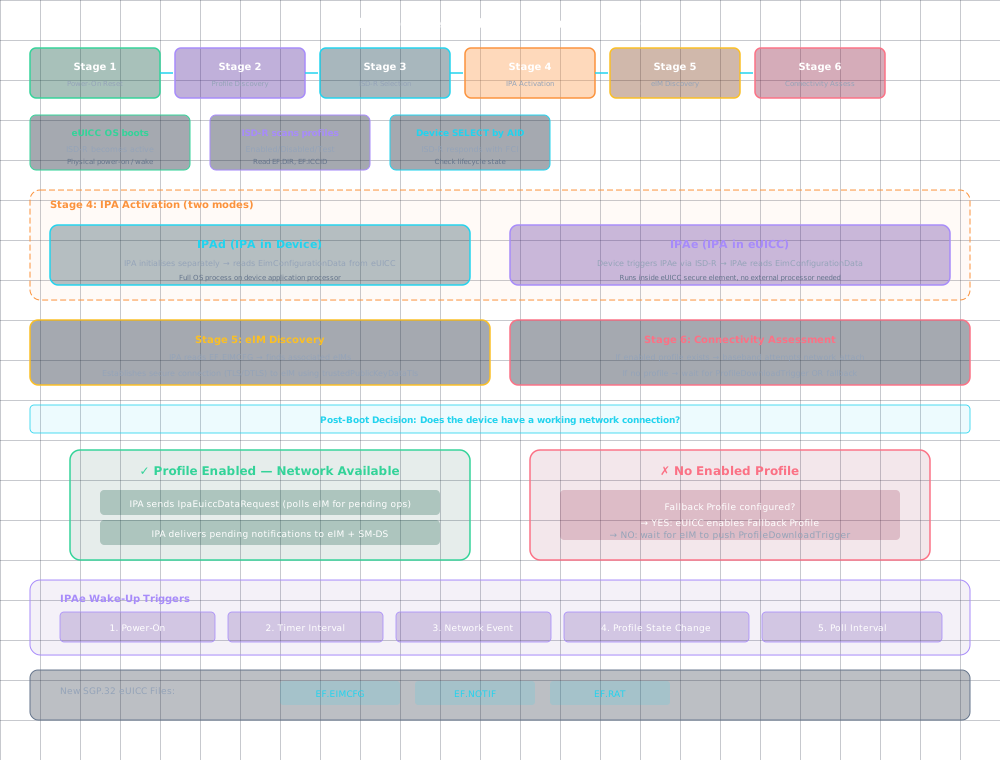
eUICC Initialisation
The eUICC initialisation sequence mirrors SGP.22 but with IoT-specific additions:
- Power-on reset : eUICC OS boots, ISD-R becomes active
- Profile discovery : ISD-R identifies enabled/disabled profiles
- ISD-R selection : the device selects ISD-R via its AID
IPAselection : ifIPAeis present, it’s activated; otherwiseIPAdinitialises separately- eIM discovery :
IPAreadsEimConfigurationDatato find associated eIMs - Connectivity assessment : if a profile is enabled, the baseband attempts network attach
IoT Device Capabilities
The device reports its capabilities to the eIM during initialisation via DeviceInfo:
DeviceInfo ::= SEQUENCE {
 tac OCTET STRING, -- Type Allocation Code
 deviceCapabilities DeviceCapabilities,
 ...
}

DeviceCapabilities includes:
 - ipaMode: IPAd or IPAe
 - supportedTransports: HTTP, CoAP, MQTT, non-IP
 - gsmAssociation: Whether the IPA is part of a device management client
 - lpaFeatures: Which LPA features are supported
The eIM uses this to decide its communication strategy: an IPAe on an NB-IoT sensor needs very different handling than an IPAd on a Linux gateway.
eUICC File Structure
The eUICC presents a standardised file system to the device. Critical files for IoT operation:
| File | Path | Content |
|---|---|---|
EF.DIR |
3F00/2F00 |
Application directory: lists AIDs of installed applications |
EF.ICCID |
3F00/2FE2 |
Integrated Circuit Card Identifier |
EF.EID |
ISD-R | eUICC Identifier: 32-digit unique chip ID |
EF.PL |
3F00/2F05 |
Preferred Languages |
EF.SMDP |
ISD-R | Default SM-DP+ address |
EF.SMDS |
ISD-R | Root SM-DS address |
EF.EIMCFG |
ISD-R | Per-eIM Configuration Data (new in SGP.32) |
EF.RAT |
ISD-R | Rules Authorisation Table |
EF.NOTIF |
ISD-R | Pending notification list |
ISD-R Selection and IPAe Activation
When the IPA is inside the eUICC (IPAe), selection follows a specific sequence:
1. Device sends SELECT by AID for ISD-R
2. ISD-R responds with FCI (File Control Information)
3. Device checks ISD-R lifecycle state
4. If IPAe is implemented:
 a. Device triggers IPAe activation via ISD-R service
 b. IPAe reads EimConfigurationData
 c. IPAe initiates eIM Package Retrieval if applicable
Triggering IPAe for eIM Package Retrieval
The IPAe can be triggered to check for pending eIM Packages through several mechanisms:
- Power-on : automatic on device boot
- Timer : periodic wake-up based on configured interval
- Network event : triggered by modem attach/detach
- Profile state change : when a profile is enabled/disabled/deleted
- Poll interval : configurable polling of
eIMfor new packages
The trigger mechanism is implementation-specific but the retrieval procedure is standardised: the IPAe opens a secure connection to the eIM (using the configured protocol from EimSupportedProtocol) and calls ESipa.TransferEimPackage or its CoAP equivalent.
Boot Sequence Summary
POWER ON
 │
 ▼
eUICC boot → ISD-R active → Profile discovery
 │
 ▼
Device selects ISD-R → reads EF.DIR, EF.ICCID
 │
 ├── IPAd path:
 │ IPA initialises → reads EimConfigurationData from eUICC
 │ Establishes secure connection to eIM
 │ Sends IpaEuiccDataRequest (polls for pending operations)
 │
 └── IPAe path:
 Device triggers IPAe → IPAe reads EimConfigurationData
 IPAe establishes secure connection to eIM
 IPAe polls for pending eIM Packages
 │
 ▼
If Enabled Profile exists:
 Baseband executes network attach
 Device reports connectivity status to eIM
 │
 ▼
If no Enabled Profile:
 Device waits for eIM to push ProfileDownloadTrigger
 OR enters Fallback Mechanism if Fallback Profile configured
Fallback Mechanism Initialisation
During boot, if no profile is enabled (or the enabled profile fails to attach), the eUICC checks for a profile with the Fallback Attribute set. If found:
- eUICC disables the failing profile (if any)
- eUICC enables the Fallback Profile
- eUICC generates a
disableNotificationandenableNotification - Baseband attaches using the Fallback Profile
IPAdelivers notifications to theeIM
The Fallback Profile is typically a provisioning profile from the device manufacturer: enough connectivity to reach the eIM and request corrective action, but not intended for normal operation.
Summary
- Six-stage boot sequence ensures the eUICC,
IPA, and associated eIMs are ready before any profile operations begin DeviceInforeports capabilities to theeIM, enabling protocol and flow adaptation per device class- New SGP.32 eUICC files (
EF.EIMCFG,EF.NOTIF) extend the SGP.22 file structure for IoT-specific data - Fallback Mechanism provides autonomous recovery at boot time when no operational profile is viable
Based on GSMA SGP.32 v1.3, Sections 3.8 and SGP.31 v1.3, Section 5
| ← Previous: Notifications and Error Handling in IoT eSIM | Section Index | Next: Profile State Management via the eIM: Remote Enable, Disable, Delete → |