eUICC.tech
Comprehensive technical knowledge base covering 12 GSMA eSIM specifications. 84+ articles on Remote SIM Provisioning — SGP.02, SGP.22, SGP.32, SGP.41, SGP.29, SGP.23, SGP.25, SGP.26 and more.
Project maintained by AlexsCodingAgent Hosted on GitHub Pages — Theme by mattgraham
Profile State Management via the eIM: Remote Enable, Disable, Delete
eUICC.tech > SGP.32 IoT eSIM > Profile State Management via the eIM: Remote Enable, Disable, Delete
Why this matters: In consumer eSIM, you tap “Enable” in Settings. In IoT, a server sends a signed binary blob across the internet and the eUICC executes it without any human involvement: then cryptographically proves it did so. This article covers the full lifecycle of PSMO (Profile State Management Operations), the mechanism that makes fleet-scale remote profile control possible.
Key takeaways:
- All PSMOs follow the same pattern:
eIMsigns →IPAdelivers → eUICC verifies → executes → signs result →IPAreturns- Six PSMO types: Enable, Disable, Delete, Rollback, SetFallbackAttribute, UnsetFallbackAttribute
- Each PSMO validates preconditions (profile state, Policy Rules) before execution
- Rollback provides safety net when the
IPAloses connectivity after executing a PSMO- Immediate Profile Enabling allows first-boot provisioning in a single flow without extra eIM round trips
In consumer eSIM, you tap “Enable” in Settings. In IoT, a server sends a signed binary blob across the internet and the eUICC executes it without any human involvement. This article covers the full lifecycle of PSMO (Profile State Management Operations) as executed through the eIM Package protocol.
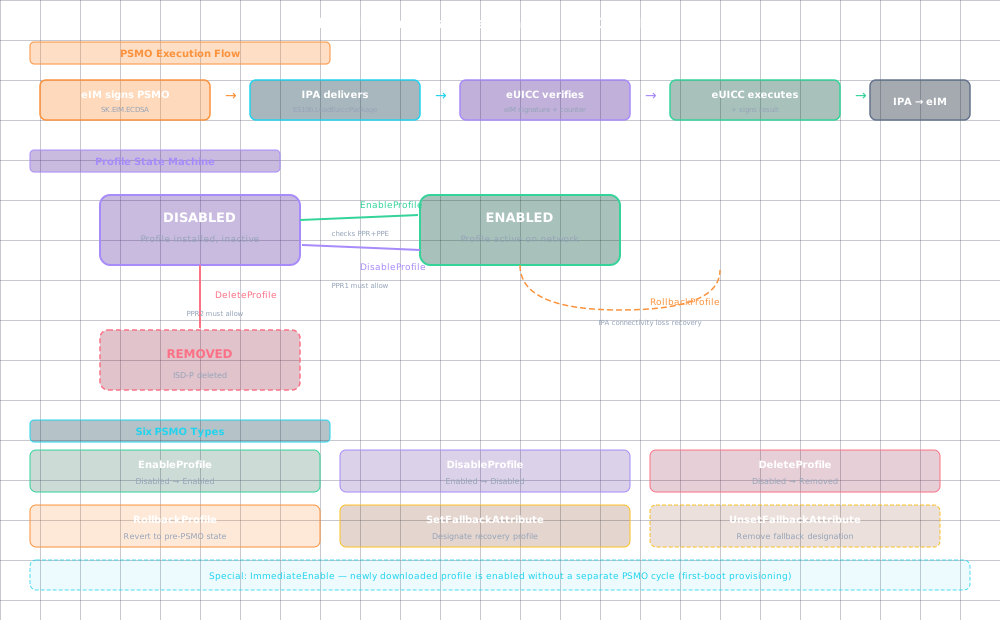
The PSMO Model
All profile state changes in IoT follow the same pattern:
eIM creates EuiccPackageRequest containing Psmo(s)
 ↓
eIM signs with SK.EIM.ECDSA
 ↓
eIM → IPA: eIM Package (via ESipa)
 ↓
IPA → eUICC: ES10b.LoadEuiccPackage
 ↓
eUICC verifies eIM signature against stored eimPublicKeyData
 ↓
eUICC verifies counterValue (anti-replay)
 ↓
eUICC executes each PSMO
 ↓
eUICC generates signed EuiccPackageResult
 ↓
IPA → eIM: Delivers result
Enable Profile
Making a profile active on the eUICC.
Start conditions:
 - Target Profile is in Disabled state
 - Profile Policy Rules allow enabling

eUICC execution:
 1. Identify target Profile (by ICCID or ISD-P AID)
 2. Verify Profile is in Disabled state
 3. Check Profile Policy Rules (ppr1 : "Disabling not allowed" on currently enabled profile)
 4. Mark target Profile "to be enabled"
 5. Record whether Rollback Mechanism usage is allowed
 6. Generate enableResult

After eUICC Package execution (in 3.3.1 Generic flow):
 7. ISD-R sends REFRESH proactive command (UICC Reset or SIM Change mode)
 8. Baseband responds with Terminal Response or RESET
 9. ISD-R disables currently Enabled Profile
 10. ISD-R enables target Profile
 11. Generate enableNotification
Result codes: ok(0), iccidOrAidNotFound(1), profileNotInDisabledState(2), disablingNotAllowed(3), pprNotAllowed(4)
Disable Profile
Deactivating a profile without deleting it.
Start conditions:
 - Target Profile is in Enabled state
 - Profile Policy Rules allow disabling (ppr1 check)

eUICC execution:
 1. Verify Profile is in Enabled state
 2. Check ppr1: if "Disabling not allowed," reject
 3. Check ppr3: if "Delete after disable" is set, mark Profile for auto-deletion after disable
 4. Mark target Profile "to be disabled" [and optionally "to be deleted"]

After execution:
 5. REFRESH → Terminal Response/RESET
 6. ISD-R disables [and deletes if marked] target Profile
 7. If another Profile was previously enabled, re-enable it
 8. Generate disableNotification [and deleteNotification]
Result codes: ok(0), iccidOrAidNotFound(1), profileNotInEnabledState(2), pprNotAllowed(4)
Delete Profile
Permanently removing a profile and its ISD-P.
Start conditions:
 - Target Profile is in Disabled state
 - Profile Policy Rules allow deletion (ppr2 check)

If Profile is Enabled:
 - Must first be disabled (check ppr1)
 - ISD-R marks Profile for disable-then-delete

eUICC execution:
 1. Verify Profile state is appropriate
 2. Check ppr2: if "Deletion not allowed," reject
 3. Mark Profile "to be deleted" (or "to be disabled and deleted")
 4. Generate deleteResult

After execution:
 5. REFRESH if profile was enabled
 6. ISD-R deletes ISD-P and all Profile Components
 7. Generate deleteNotification
Result codes: ok(0), iccidOrAidNotFound(1), profileNotInDisabledState(2), pprNotAllowed(4)
Rollback Profile
A safety mechanism for connectivity-loss scenarios.
Trigger: IPAd fails to deliver eUICC Package Result to eIM

IPA → eUICC: ES10b.ProfileRollback

eUICC:
 1. Reverts all Profiles to their pre-PSMO states
 2. Discards the undelivered eUICC Package Result
 3. Discards any notifications generated by the reverted operations
 4. Generates a new eUICC Package Result reflecting the rollback

IPA:
 5. Discards the old eUICC Package Result
 6. Builds new eUICC Package Result with the rollback result
 7. Attempts delivery again
Rollback is only valid if the PSMO execution recorded “Rollback Mechanism usage is allowed.”
Fallback Attribute Management
Two additional PSMOs manage the eUICC’s autonomous safety net:
SetFallbackAttribute
Designates a profile as the fallback: the one the eUICC enables if connectivity is lost.
Restrictions:
 - Profile must be an Operational Profile
 - Profile must be in Disabled state
 - Fallback not already configured on another profile

Error: fallbackProfileEnabled(3) if you try to set fallback on the currently enabled profile
UnsetFallbackAttribute
Removes the fallback designation.
Error: noFallbackAttribute(2) if no fallback is set
Error: fallbackProfileEnabled(3) if the fallback profile is currently enabled
Immediate Profile Enabling
A special SGP.32 feature: after a profile download from the default SM-DP+, the IPA can request immediate enabling without going through a separate eIM Package PSMO cycle.
After profile installation:
 IPA → eUICC: ES10b.ImmediateEnable
 eUICC enables the newly installed Profile
 Generates enableNotification

Configuration:
 eIM can pre-authorise this via the "Configure by eIM of
 Immediate Profile Enabling" procedure (section 3.4.4)
 OR IPA can request it independently (section 3.4.5)
This is used for “first boot” provisioning: download the profile and activate it in one flow, without the latency of an additional eIM round trip.
Configuring Immediate Profile Enabling
The eIM can pre-configure whether downloaded profiles should be immediately enabled:
By eIM: ES10b.ConfigureImmediateEnable(eIM-signed) : the eIM sends this as a standalone configuration command outside the PSMO framework.
By IPA: The IPA can independently set this via ES10b.ConfigureImmediateEnable(IPA-initiated) during the profile download flow. The IPA typically does this when it knows the current profile is a provisioning profile that should be replaced immediately.
Profile State Management Error Codes (Complete)
| Error Code | Value | Applies To |
|---|---|---|
ok |
0 | All |
iccidOrAidNotFound |
1 | Enable, Disable, Delete, SetFallback |
profileNotInDisabledState |
2 | Enable, Delete |
profileNotInEnabledState |
2 | Disable |
disablingNotAllowed |
3 | Enable |
pprNotAllowed |
4 | Enable, Disable, Delete |
fallbackNotAllowed |
2 | SetFallback |
noFallbackAttribute |
2 | UnsetFallback |
fallbackProfileEnabled |
3 | SetFallback, UnsetFallback |
commandError |
7 | UnsetFallback, eCOs |
profileChangeOngoing |
11 | GetProfilesInfo |
undefinedError |
127 | All |
Summary
- All PSMOs follow a uniform signed-package flow:
eIMsigns → eUICC verifies → executes → signs result - Six PSMO types cover enable, disable, delete, rollback, and fallback attribute management
- Precondition checks (profile state, Policy Rules) gate every operation before the REFRESH cycle
- Rollback and Immediate Profile Enabling provide safety and efficiency for the two most common IoT edge cases
Based on GSMA SGP.32 v1.3, Sections 3.3-3.4
| ← Previous: IoT Device Initialisation and the eUICC File Structure | Section Index | Next: SM-DS Operations in IoT eSIM: Event Registration and Retrieval → |